Neon Ink Tag Theme
:::info Document Lineage
Source: Docs/NeonInk-TagTheme.md. The source document opens with its own alignment note: this tag-theme note is a pre-NIPC source reference. Its core idea — that tag colors carry meaning — is now canonicalized in NIPC, including expanded color families, psychological intent, intensity, and validation rules. It is kept here as the earliest design note in the chain.
:::
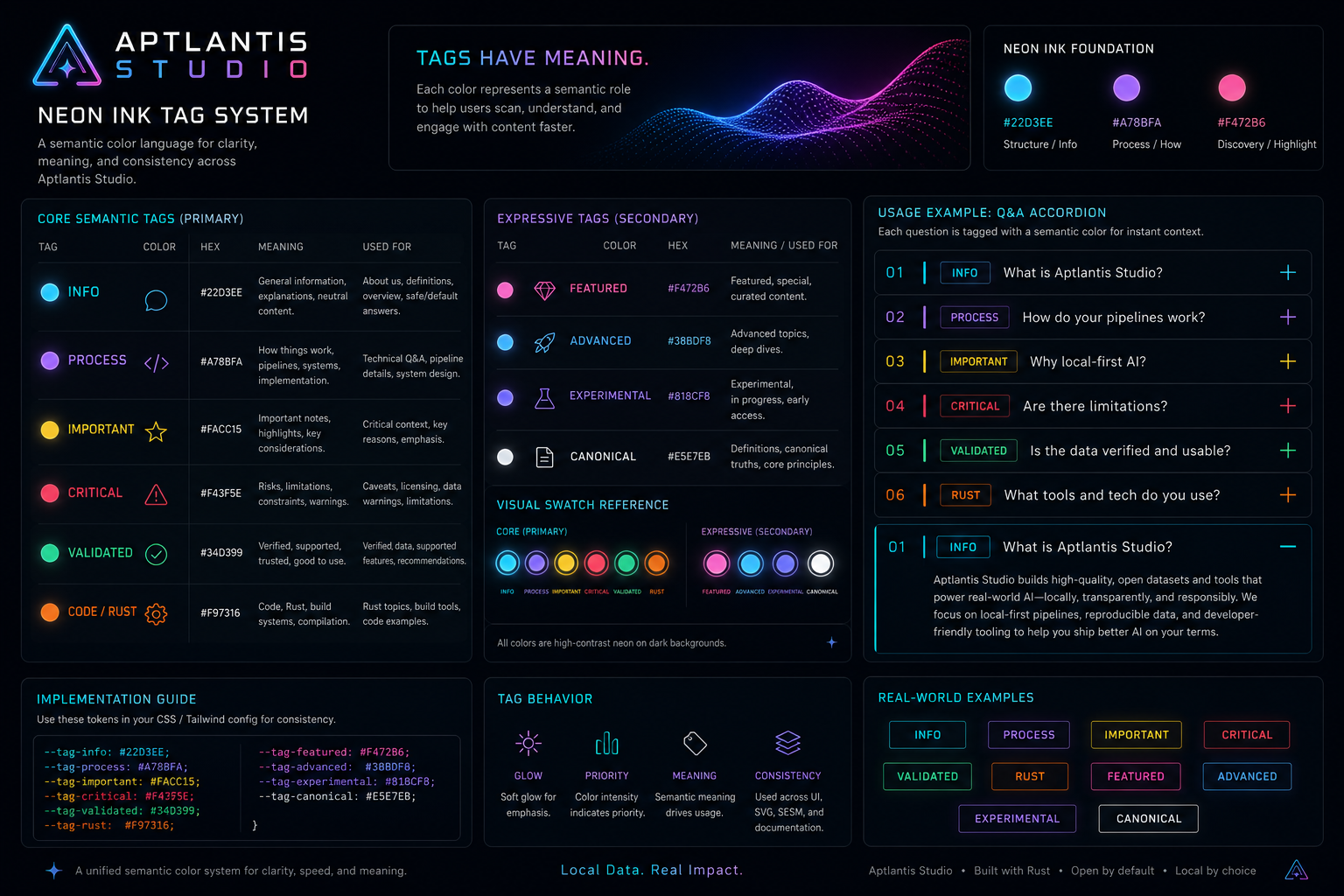
Tag Colors = Meaning + Behavior + Visual Identity
:::note Missing Source Image
The source document also references ../assets/dalle/ExpressiveCreativeTags.png as a conceptual illustration. That file does not exist anywhere in the source assets/ tree (there is no assets/dalle/ folder), so it is omitted here rather than linked as a broken image.
:::
Design Goal
Tags should:
- pop visually (neon)
- feel consistent with Neon Ink
- carry meaning across pages (About, datasets, pipelines, docs)
- plug into your generator later
System Structure
Each tag has:
NAME → HEX → ROLE → USAGE
And optionally later:
state → glow → priority → SESM tag
Palette Set 1 — Core Semantic Tags
These are the primary system-level tags.
Neon Blue — "Info / General"
#22D3EE
Meaning: general info, explanations, safe/default. Use: "What is Aptlantis Studio?", neutral Q&A, docs references.
Neon Violet — "Process / How"
#A78BFA
Meaning: pipelines, systems, implementation details. Use: "How does the pipeline work?", technical Q&A.
Neon Yellow — "Important / Attention"
#FACC15
Meaning: important notes, caveats, highlights. Use: "Why local-first matters", warnings / emphasis.
Neon Red — "Critical / Risk / Constraint"
#F43F5E
Meaning: limitations, constraints, failures / risks. Use: licensing caveats, dataset warnings.
Neon Green — "Validated / Good"
#34D399
Meaning: verified, recommended, production-ready. Use: "Is this dataset usable?", "Yes / supported".
Neon Orange — "Code / Rust / Build"
#F97316
Meaning: Rust, compilation, code-heavy topics. Use: Rust datasets, pipeline internals.
Palette Set 2 — Expressive / Creative Tags
These give more flavor for Studio-specific content.
Neon Magenta — "Featured / Highlight"
#F472B6 — Meaning: featured, special, creative datasets.
Deep Neon Blue — "Advanced / Deep Dive"
#38BDF8 — Meaning: deeper explanations, advanced technical content.
Electric Indigo — "Experimental"
#818CF8 — Meaning: experimental pipelines, in-progress ideas.
Neon White — "Definition / Canonical"
#E5E7EB — Meaning: definitions, core statements, canonical explanations.
Visual Swatch Layout
Grouped like this for theme boards:
Core System Tags
[ CYAN ]   [ VIOLET ]   [ YELLOW ]
[ RED  ]   [ GREEN  ]   [ ORANGE ]
Expressive Layer
[ MAGENTA ] [ BLUE ] [ INDIGO ] [ WHITE ]
Tag Behavior
Instead of just color, define behavior:
{
  "tag": "process",
  "color": "#A78BFA",
  "glow": "soft",
  "priority": "medium",
  "usage": ["pipelines", "how-it-works"]
}
Q&A Page Application
[01] WHAT IS APTLANTIS STUDIO?
Tag: INFO (cyan)

[02] HOW DO YOUR PIPELINES WORK?
Tag: PROCESS (violet)

[03] WHY LOCAL-FIRST?
Tag: IMPORTANT (yellow)

[04] ARE THERE LIMITATIONS?
Tag: CRITICAL (red)

[05] IS THIS DATA VERIFIED?
Tag: VALIDATED (green)
Visual Pattern — each accordion row: left = number, next = colored tag indicator (small bar or dot), title text, right = +/− icon.
CSS / Tailwind Token Idea
// tailwind.config.js
colors: {
  studio: {
    cyan: "#22D3EE",
    violet: "#A78BFA",
    yellow: "#FACC15",
    red: "#F43F5E",
    green: "#34D399",
    orange: "#F97316",
    magenta: "#F472B6"
  }
}
Future (SESM Integration)
Each Q&A block could eventually include:
{
  "tag": "process",
  "semantic_role": "pipeline-explanation"
}
Now tags become UI styling, machine-readable meaning, and dataset categorization.
Recommendation
Start with the 6 core tags (cyan, violet, yellow, red, green, orange). Then layer in magenta + indigo later.
Big Picture
This created a semantic color language that unifies Q&A, datasets, pipelines, docs, SVG artifacts, and SESM metadata — later formalized as NIPC.